
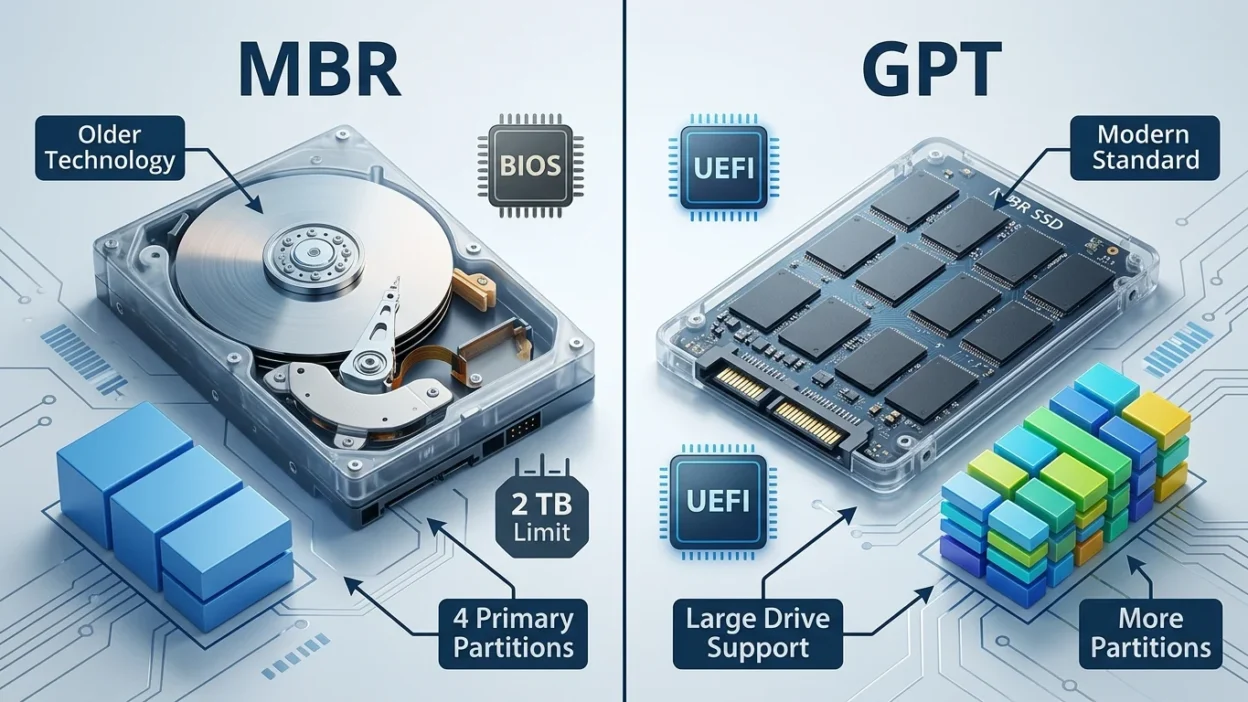
If you are installing an operating system, setting up a new hard drive, or reading computer guides, you may see the terms GPT and MBR. Many beginners are not sure what these terms mean or which one they should choose.
The confusion happens because both GPT and MBR are used to organize and manage storage drives. They both help a computer understand how data is stored on a hard disk or SSD. Since they do a similar job, many people think they are the same thing.
However, GPT and MBR have important differences. Understanding those differences can help you avoid problems when installing an operating system or using a storage device.
This guide explains everything in simple English.
Quick Answer
- GPT stands for GUID Partition Table.
- MBR stands for Master Boot Record.
- GPT is the newer and more advanced system.
- MBR is the older system.
- GPT supports larger drives.
- GPT allows more partitions.
- GPT works best with modern computers.
- MBR is mainly used for older systems.
- For most users today, GPT is the better choice.
Simple Origin or Background Explanation
Before a computer can use a storage drive, the drive needs a partition system. A partition system tells the computer where data starts, where it ends, and how the drive is organized.
What Is MBR?
MBR was introduced many years ago when storage drives were much smaller than they are today.
For a long time, MBR was the standard partition style used by computers around the world.
It worked well for older hardware and operating systems.
What Is GPT?
GPT was created later as part of a newer computer system called UEFI.
As storage drives became larger and computers became more advanced, a better partition system was needed.
GPT was designed to solve many of the limitations found in MBR.
Today, most modern computers use GPT.
Clear Explanation of the Difference
The easiest way to understand GPT and MBR is to think of them as two different ways of organizing a storage drive.
Both do the same basic job, but GPT offers more features and fewer limitations.
Storage Capacity
One major difference is the maximum drive size they support.
MBR can only handle drives up to about 2 TB.
GPT can handle drives much larger than that.
If you have a large modern drive, GPT is usually the better option.
Number of Partitions
A partition is a separate section of a storage drive.
With MBR, you can create only four primary partitions.
With GPT, you can create many more partitions without special workarounds.
This gives users much more flexibility.
Reliability
GPT stores backup information in multiple locations on the drive.
If one part becomes damaged, recovery is often easier.
MBR stores important information in only one main location.
If that area becomes corrupted, problems can occur.
Compatibility
MBR works with many older computers and operating systems.
GPT is designed mainly for modern systems.
Most new computers support GPT without any issues.
Boot Mode
MBR usually works with BIOS systems.
GPT is commonly used with UEFI systems.
Since most modern computers use UEFI, GPT has become the preferred choice.
Comparison Table
| Feature | GPT | MBR |
| Full Name | GUID Partition Table | Master Boot Record |
| Age | Newer | Older |
| Maximum Drive Size | Supports very large drives | Limited to about 2 TB |
| Number of Partitions | Many partitions | Four primary partitions |
| Reliability | Better protection and backups | Less protection |
| Modern Computer Support | Excellent | Limited |
| UEFI Support | Yes | No |
| BIOS Support | Limited | Yes |
| Best For | Modern systems | Older systems |
Which One to Use and When
Choosing between GPT and MBR depends on your computer and your needs.
Use GPT When
- You have a modern computer.
- Your system uses UEFI.
- Your drive is larger than 2 TB.
- You want better reliability.
- You are installing a modern operating system.
- You want more partition options.
Use MBR When
- You have an older computer.
- Your system uses BIOS only.
- You need compatibility with older operating systems.
- You are working with older hardware.
Best Choice for Most People
For most users in 2026, GPT is the recommended choice because modern computers are built to work with it.
Common Mistakes People Make
Many beginners make the same mistakes when dealing with GPT and MBR.
Thinking GPT and MBR Are File Systems
GPT and MBR are not file systems.
A file system is something like NTFS, FAT32, or exFAT.
GPT and MBR simply organize the drive.
Choosing MBR on a Modern Computer
Some people choose MBR because they think it is simpler.
In most cases, GPT is the better option on modern hardware.
Ignoring Computer Compatibility
A drive formatted with GPT may not work correctly on some very old systems.
Always check your computer’s capabilities first.
Converting Without Backups
Changing a drive from MBR to GPT or GPT to MBR can sometimes erase data.
Creating a backup before making changes is always a smart idea.
Confusing BIOS and UEFI
Many users mix up BIOS and UEFI.
Remember:
- BIOS is older.
- UEFI is newer.
- GPT works best with UEFI.
Everyday Real Life Examples
Emails
A company employee buys a new 4 TB SSD for work.
Because the drive is larger than 2 TB, GPT is the practical choice.
News
Technology news often mentions larger storage drives and modern hardware.
These devices usually use GPT because it supports modern storage needs.
Social Media
A user posts that their computer cannot install an operating system.
After checking, they discover the drive uses the wrong partition style for their system.
Switching to GPT solves the problem.
Daily Use
A student buys a new laptop.
The laptop uses UEFI firmware and comes with a GPT formatted SSD because it is the standard setup for modern devices.
Short Learning Section for Students and Beginners
Here is a simple way to remember the difference.
Remember MBR as the Older Option
Think of MBR as an older storage management system.
It still works, but it has limits.
Remember GPT as the Modern Option
Think of GPT as the updated version.
It supports larger drives, more partitions, and better reliability.
Easy Memory Trick
You can remember it like this:
- MBR = Old
- GPT = New
Or:
- MBR = More Limits
- GPT = Greater Possibilities
This simple trick helps many students remember the difference quickly.
FAQ
What does GPT stand for?
GPT stands for GUID Partition Table. It is a modern partition system used on storage drives.
What does MBR stand for?
MBR stands for Master Boot Record. It is an older partition system.
Which is better, GPT or MBR?
For most modern computers, GPT is better because it supports larger drives and offers more features.
Can I convert MBR to GPT?
Yes, conversion is possible. However, you should always back up important data first.
Does GPT make a computer faster?
No. GPT mainly affects drive organization and compatibility. It does not directly increase computer speed.
Can Windows use GPT?
Yes. Modern versions of Windows work very well with GPT.
Is MBR still used today?
Yes. Some older computers and systems still use MBR.
Can GPT work on older computers?
Some older computers may not fully support GPT, especially if they use older BIOS firmware.
Conclusion
GPT and MBR are two different ways of organizing a storage drive. MBR is the older method, while GPT is the newer and more advanced option.
GPT supports larger drives, allows more partitions, and provides better reliability. MBR still has value for older systems, but it comes with several limitations.
For most people using modern computers in 2026, GPT is the recommended choice. If your computer supports UEFI and you are using a newer storage drive, GPT will usually provide the best experience.
Understanding this difference makes it much easier to choose the right setup for your computer and avoid common installation problems.

Daniel Matthew is a language enthusiast, writer, and contributor at Meanefy.com, where he explores the meanings, origins, and nuances of words and phrases. With a deep passion for language, Daniel aims to make complex concepts simple, engaging, and easy to understand for readers of all ages.